
How to change your greeting
Short answer: You can update your greeting using text-to-speech or recording a message in your own voice.
Using Text-To-Speech Greetings

🟦 Log in at officetree.com.
🟦 Launch Officetree Phone if it is not already launched.
🟦 View your Officetree phone numbers.

🟦 Locate and click the settings icon next to your number:

🟦 Scroll down the page to the Outgoing Greeting(s) section and click the pencil icon next to the applicable greeting you wish to edit. The "When Open" message plays during your business hours and the "When Closed" message plays after hours. (Note: if you have a main menu configuration, your business hours are configurable at the top of the number settings page; otherwise, your business hours are controlled on the Extensions page for your one-and-only extension.)

🟦 Edit the words you wish the system to speak and click Save.
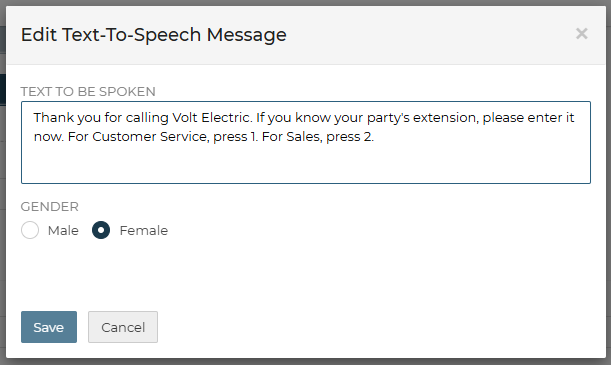
🟦 Make a quick test call and you should instantly hear your new greeting!
Using A Custom Audio Greeting
Note: For these instructions, please use a computer and not a mobile phone browser.
🟦 Log in at officetree.com.
🟦 Launch Officetree Phone if it is not already launched.
🟦 View your Officetree phone numbers.
🟦 Locate and click the settings icon next to your number:
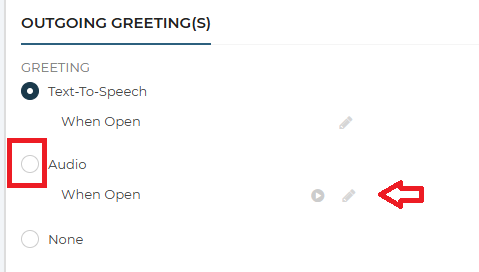
🟦 Scroll down the page to the Outgoing Greeting(s) section and click the "Audio" option and then the pencil icon next to the applicable greeting you wish to edit. The "When Open" message plays during your business hours and the "When Closed" message plays after hours. (Note: if you have a main menu configuration, your business hours are configurable at the top of the number settings page; otherwise, your business hours are controlled on the Extensions page for your one-and-only extension.)
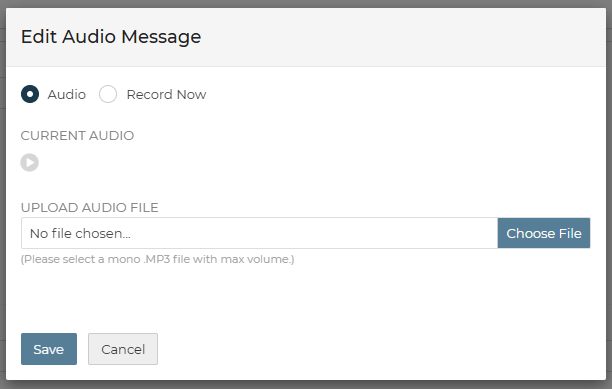
🟦 You have 2 choices.
- Record from your computer's microphone.
- Upload a pre-recorded MP3 file. (Use a small file format, single/mono channel.)
🟦 Make a quick test call and you should instantly hear your new greeting!
Recording tips
🟦 Use a quiet room with minimal echo.
🟦 Use a decent microphone or a headset.
🟦 Speak clearly, at a steady pace; pause briefly between clauses.